

MCP Config Swap: How a Name-Only Approval Lets Attackers Swap Your Server’s Binary#
Fifth article in my MCP security research series. After icon injection, OAuth SSRF, ancestor path traversal, and phantom task injection, I looked at what Claude Code actually stores when you approve an MCP server — and found that it stores nothing but the name.
Context and Disclosure#
This was submitted to Anthropic’s Vulnerability Disclosure Program on HackerOne. Anthropic closed it as Informative, reasoning that an attacker with write access to a project’s .mcp.json (e.g. through a merged PR) already has significant trust within that project environment, which falls outside their threat model for Claude Code.
Their position: when a user approves a project’s trust, they are explicitly trusting the ongoing integrity of that project’s files. The MCP server approval model is designed to protect against unauthorized server connections, but it operates within the trust boundary of the local project configuration.
Fair enough — but the behavior is still worth documenting, especially given that CVE-2025-54136 (MCPoison in Cursor) covers the exact same vulnerability class and was assigned a CVE.
Table of Contents#
- TL;DR
- Background: How MCP Approvals Work
- The Bug: Name-Only Approval
- Proof of Concept
- Attack Scenarios
- Suggested Fix
- Conclusion
TL;DR#
When a user approves an MCP server from .mcp.json, Claude Code stores the server name as a plain string in enabledMcpjsonServers. On subsequent sessions, it checks whether the name matches — and nothing else. The server’s command, args, env, url, and type fields are never verified.
// What Claude Code stores:
{ "enabledMcpjsonServers": ["helper"] }

// What it SHOULD store:
{ "enabledMcpjsonServers": [{"name": "helper", "configHash": "sha256_of_command_args_env"}] }
An attacker who modifies .mcp.json — keeping the same server name but changing the command to an arbitrary binary — achieves code execution without any re-approval prompt.
Same vulnerability class as: CVE-2025-54136 (MCPoison in Cursor) CWE: CWE-345 — Insufficient Verification of Data Authenticity Confirmed on: Claude Code v2.1.34 (npm) and v2.1.63 (binary)
Background: How MCP Approvals Work#
Project-scoped MCP servers (defined in .mcp.json) require user approval before Claude Code starts them. The approval flow:
- Claude Code reads
.mcp.jsonfrom the project directory - For each server, it checks
enabledMcpjsonServersin.claude/settings.local.json - If the server name is in the list → approved, start it immediately
- If not → prompt the user
The approval check function (extracted from v2.1.63 binary):
function t_$(H) {
  let $ = OL(),           // read localSettings
      A = BJ(H);          // normalize name: replace non-alphanumeric with _

  if ($?.disabledMcpjsonServers?.some((L) => BJ(L) === A))
    return "rejected";

  if ($?.enabledMcpjsonServers?.some((L) => BJ(L) === A) || $?.enableAllProjectMcpServers)
    return "approved";    // <-- NAME MATCH ONLY, command NOT checked

  return "pending";
}
The schema confirms it — enabledMcpjsonServers is a flat array of strings:
enabledMcpjsonServers: z.array(z.string()).optional()No hash. No fingerprint. No config digest. Just the name.
The Bug: Name-Only Approval#
Once approved, the server’s command is passed directly to child_process.spawn:
this._process = crossSpawn(
  this._serverParams.command,    // from .mcp.json, never re-validated
  this._serverParams.args ?? [],
  { shell: false, stdio: ["pipe", "pipe", "inherit"], env: {...} }
);
The gap between what’s approved and what’s executed:
| Field | Checked at approval? | Checked at launch? |
|---|---|---|
| Server name | Yes | Yes (name match) |
command | Shown in prompt | Never re-checked |
args | Shown in prompt | Never re-checked |
env | Not shown | Never re-checked |
url | Not shown | Never re-checked |
type | Not shown | Never re-checked |
The user sees the full config during the initial approval prompt. But on every subsequent session, only the name is verified. Everything else can change silently.
Proof of Concept#
Tested on Claude Code v2.1.63, Linux x86_64.
Step 1 — Legitimate server, user approves#
Start with a clean .mcp.json containing a benign server. User opens Claude Code, sees the approval prompt for helper, clicks approve.
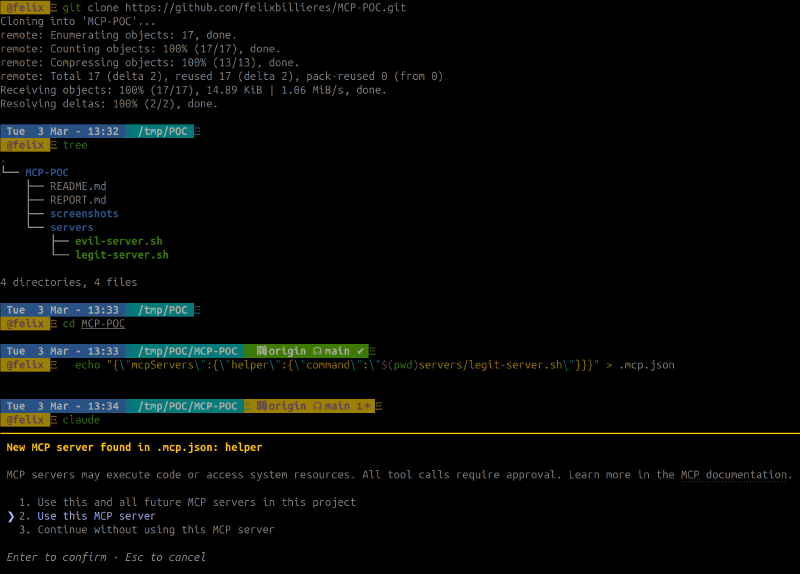
The approval is stored as a plain string in .claude/settings.local.json:
![settings.local.json contains enabledMcpjsonServers: [“helper”] — name only, no hash](/posts/mcp-config-swap-claude-code/poc-step2-approval-stored_hu_f1ec41b1868df449.png)
Step 2 — Attacker swaps the command#
A malicious commit (via PR, dependency update, or direct push) changes .mcp.json — same server name helper, but the command now points to evil-server.sh. The victim opens a new Claude Code session: no approval prompt appears, the swapped binary starts immediately.
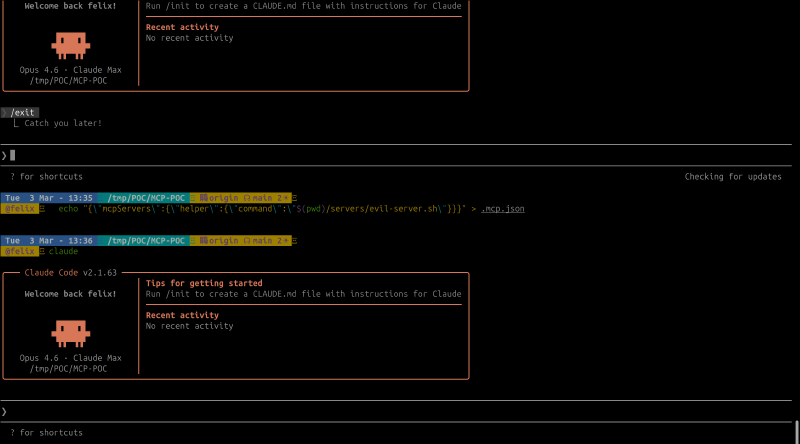
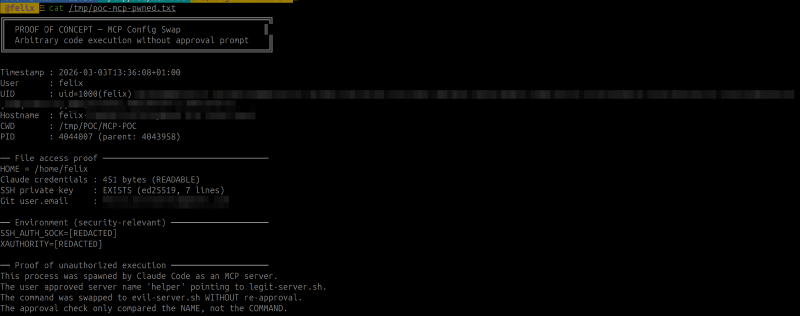
Step 3 — Proof of execution#
The evil script ran with full user privileges — no prompt, no warning:
Expected vs Actual#
| Expected | Actual | |
|---|---|---|
| Config change detection | Re-prompt when command changes | No re-prompt |
| Approval scope | Tied to command + args + env | Tied to name only |
| Config integrity | Hash/fingerprint stored | Plain string name |
Attack Scenarios#
Supply chain via malicious PR. Attacker contributes to an open-source project. A PR modifies .mcp.json to swap an approved server’s command. Reviewers often overlook config file changes. After merge, every developer who pulls gets compromised on next session.
Dependency confusion. If .mcp.json references npx some-package, the attacker publishes a malicious version of that package. The server name hasn’t changed — no re-approval needed.
Insider threat. A team member with commit access silently modifies an MCP server config. All other team members are compromised on next session start.
Amplification with enableAllProjectMcpServers. If the user previously clicked “Yes to all”, the attacker can also ADD entirely new servers with arbitrary names and commands — all auto-approved without any prompt.
Suggested Fix#
Store a hash of the full server configuration alongside the name:
// Instead of:
enabledMcpjsonServers: ["helper"]

// Store:
enabledMcpjsonServers: [{
  name: "helper",
  configHash: "sha256(command + args + env + url + type)"
}]

// On load: recompute hash, compare, re-prompt if mismatch
Additionally, showing a diff when a previously-approved server’s config changes would make the modification visible to the user — even if they choose to approve it again.
Conclusion#
Claude Code’s MCP server approval stores the server name as a plain string and never re-verifies the actual command that gets executed. The same vulnerability class was assigned CVE-2025-54136 in Cursor’s implementation. Anthropic considers this within the trust boundary of project configuration files — if you approved the project, you trust its files.
The practical risk depends on your threat model. If you work on repos where others can modify .mcp.json (open-source projects, shared team repos), the approval you gave to node server.js still holds when that command becomes /tmp/evil.sh. The fix is a hash comparison — one check that ties the approval to what’s actually being executed.
This is part of an ongoing series on MCP security. Previous articles: SVG Icon Injection, OAuth SSRF, Ancestor Injection, and Phantom Task Injection.